Project Salvage
Video showing the effect in action.

Main Image.

Description of the Render Textures layers, and the how the Compute Shader handles them.
Examples of the Render Texture layers being filled in realtime.
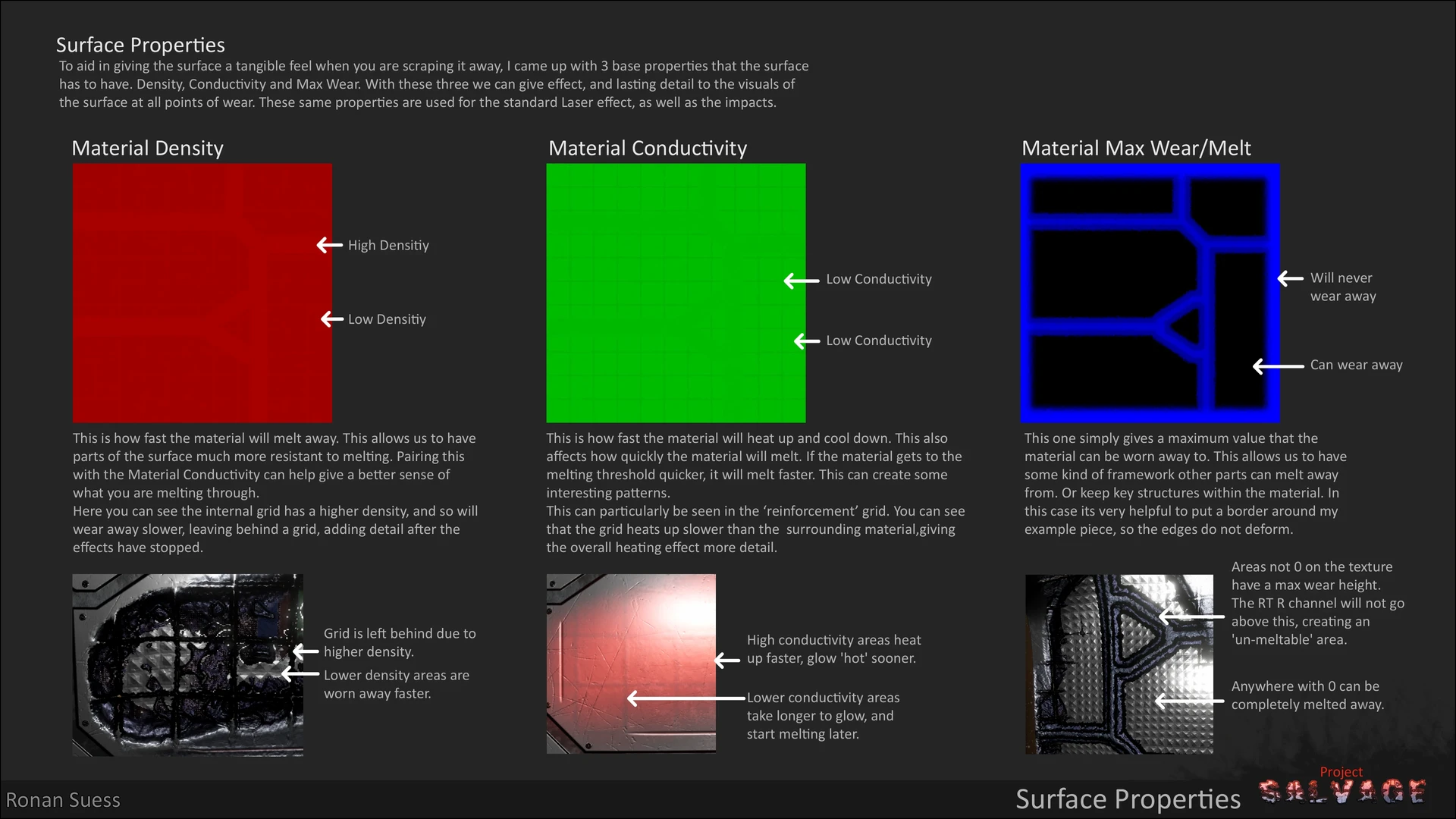
Explanation of how the Compute Shader fills in the Render Texture layers based on another texture as a rule set of maximum depth, how fast the surface heats up, and how quickly the surface is worn away.

Render Texture Red channel in the visual shader.

Render Texture Green channel in the visual shader.

Render Texture Blue channel in the visual shader.
Example of the material being entirely worn away to reveal what is/could be, behind.

Explanation and examples of how the normals are generated from the height map (Render Texture Red channel) and why the default Normal From Height couldn't be used.

The visual shader overview and layout.

Explanation and examples of the impact textures that a different Compute Shader uses to drive the Render Texture in the same way the normal salvage effect works. An example of how versatile the system is.
Example of the impacts in action.

Being a game mechanic, I also thought it important to know how much of the material has been worn away. This is an additional Compute Shader that returns the amount of the surface that has been worn away.
This is a personal project, not associated with any company. Developed in Unity 6.
I played some Star Citizen, and enjoyed their ship salvaging game loop. As a fun challenge for myself and to get more familiar with Unity’s Shader Graph and Compute Shaders, I decided to replicate the hull scraping/salvage mechanic.
To re-state, this has nothing to do with Star Citizen, beyond inspiration.
The aim was to create an object, whose surface could be worn away in layers to reveal something behind. I created a shader that uses a Render Texture as a driver for displaying different sets of textures that represent different layers of the object. The Render Texture itself is drawn by a Compute Shader. This helps performance, CPU/GPU communication time by keeping as much as possible on the GPU.
Note: The skybox is an asset store item (Starfield Space Skybox, by Sean Duffy), everything else is hand crafted by me.